rebuild the search index in Microsoft Outlook
How do I rebuild the search index in Microsoft Outlook?
If Outlook is not searching all of your email correctly, you can rebuild the Outlook search index to fix this:
-
Click on File then Options
-
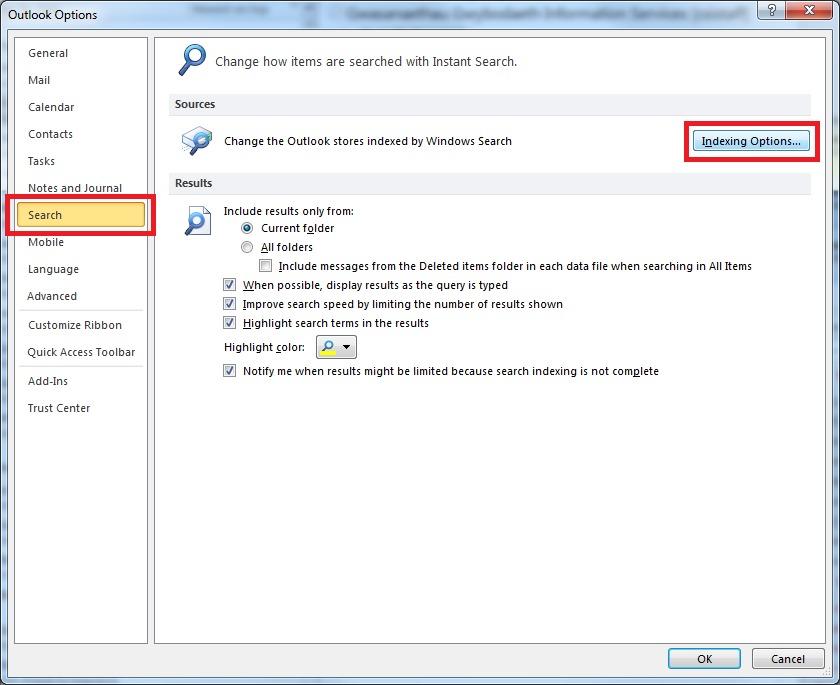
Select Search on the left then click Indexing Options
rebuild the search index in Microsoft Outlookrebuild the search index in Microsoft Outlookrebuild the search index in Microsoft Outlookrebuild the search index in Microsoft Outlookrebuild the search index in Microsoft Outlookrebuild the search index in Microsoft Outlookrebuild the search index in Microsoft Outlookrebuild the search index in Microsoft Outlookrebuild the search index in Microsoft Outlookrebuild the search index in Microsoft Outlookrebuild the search index in Microsoft Outlookrebuild the search index in Microsoft Outlookrebuild the search index in Microsoft Outlookrebuild the search index in Microsoft Outlookrebuild the search index in Microsoft Outlookrebuild the search index in Microsoft Outlookrebuild the search index in Microsoft Outlookrebuild the search index in Microsoft Outlookrebuild the search index in Microsoft Outlookrebuild the search index in Microsoft Outlookrebuild the search index in Microsoft Outlookrebuild the search index in Microsoft Outlookrebuild the search index in Microsoft Outlookrebuild the search index in Microsoft Outlookrebuild the search index in Microsoft Outlook
-
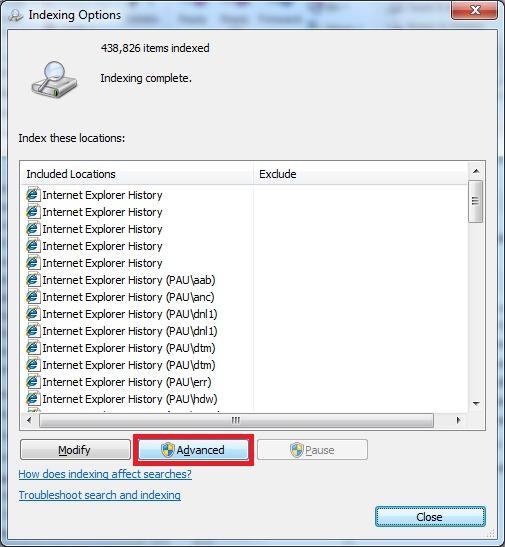
Click Advanced
-
Click the Rebuild button
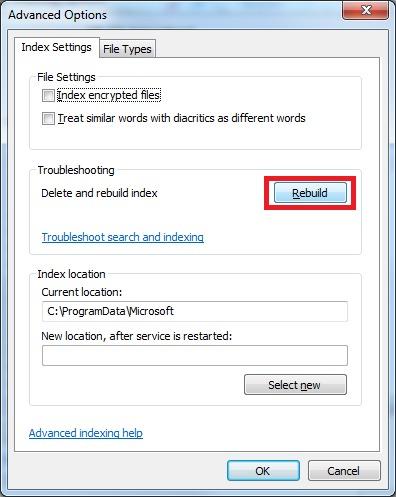
This will cause Outlook to rebuild its entire search index. This can take a long time to complete but you can continue to use Outlook and it will do this in the background.