Adding Printer in Servers using IP address
ADDING PRINTER/PLOTTER USING IP ADDRESS WITHIN CLOUD
> Go to Control Panel
> Devices and Printers
>Add a Printer
> The Printer that I wan't isn't listed
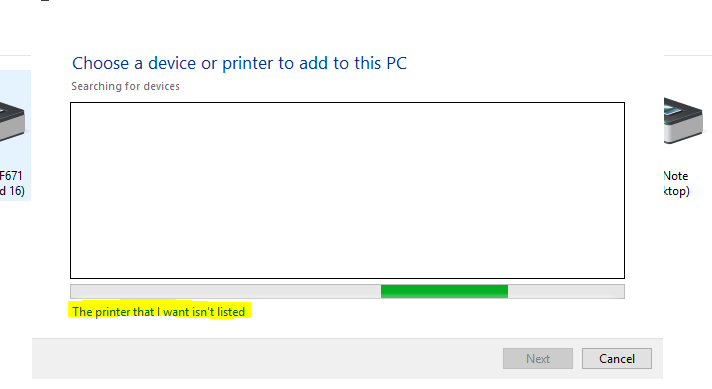
>Add a local Printer
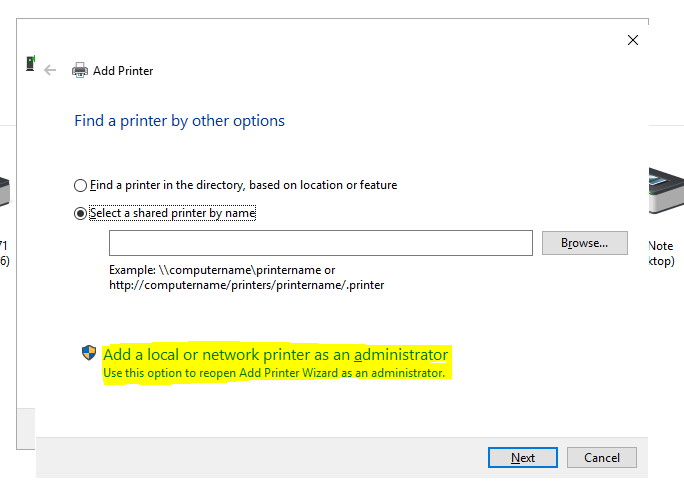
>Add a printer using TCP/IP address or hostname
>Input IP Address (check onenote: Printers & Scanners)
>Use the driver that is currently installed
>Rename
>Do not share this printer
>Uncheck 'set as default'
>Finish
HOW TO CHECK IF PRINTER IS ADDED USING IP ADDRESS
>Go to Devices and Printers
>Select a printer
>Click Printer Properties
 >Port
>Port
>Check if printers are in Standard TCP/IP (description)
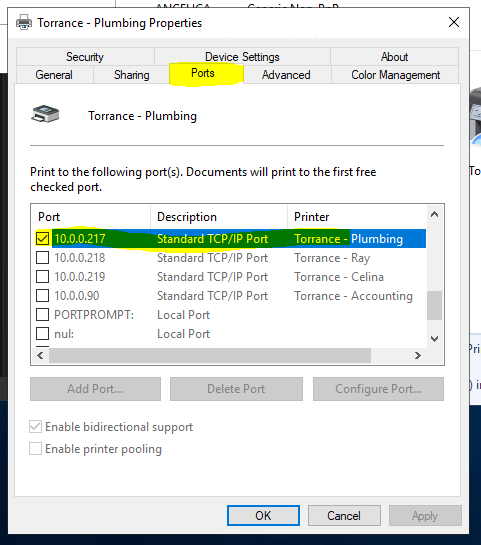
>If not added using IP, remove the printer and add it again using IP Address (follow the instructions above)